Quick replies from your watch, with optional AI suggestions
A quick “On my way” can be enough. Notify helps you answer supported Android message notifications from your wrist, with saved replies for everyday moments and optional AI suggestions when you want help finding the words.
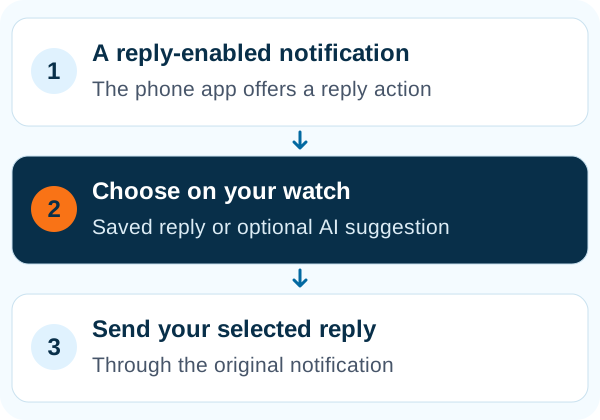
Notify quick replies use the reply action supplied by the messaging app's Android notification. On supported watches, choose a saved response with the watch controls and send it without typing on your phone.
Make everyday answers a few taps away
Create short default replies for situations such as arriving late, acknowledging a message or asking someone to call later. Add contact-specific replies when a work conversation needs different wording from a family chat.
Use the controls your watch already has
With the supported music-control method, next and previous browse the available replies and play sends the selected message. Compatible Xiaomi watches can use the Notify watch app for a dedicated experience. The controls available in your version of Notify depend on the paired model.
- Set an exit timeout
- Choose how long quick-reply mode remains available after a message.
- Keep familiar answers first
- When using AI suggestions, you can keep preset replies at the beginning of the list.
Get a starting point that fits the conversation
Optional AI integration can generate suggestions from the selected notification. Set the language, tone, reply length and emoji preference, or give guidance such as confirming, declining or asking for clarification. Browse the suggestions and select the one you want to send.
Understand what the AI option sends
When you request an AI reply, the relevant notification title and text are sent for remote processing. Review Notify's Privacy & AI Use terms and the selected provider's policy before enabling it. Saved quick replies give you a simple alternative when you do not need generated suggestions.
Common questions
Can Notify reply to every notification?
No. The Android app must provide a compatible reply action in its notification, and your watch must support a Notify reply-control method.
Does AI send a reply automatically?
The quick-reply flow lets you browse suggestions and send the response you select. Generating a suggestion is separate from choosing to send it.
Do I need AI to use quick replies?
No. Preset replies are available as their own feature. AI suggestions are optional and may have separate provider or purchase requirements.