Heart rate, SpO2 & stress trends in Notify
A number on your wrist is a moment. Notify gives you the history around it, from heart-rate charts and overnight summaries to the oxygen and stress records your wearable supports.
Notify lets you review recorded heart rate, configure supported monitoring and threshold alerts, and explore SpO2 and stress history where your device supplies those measurements. It does not add sensors your watch does not have.
Inside the app
See the feature with real Notify screens
These screens come from the Android app running with illustrative demo records. Tap an image to inspect the details at full size.
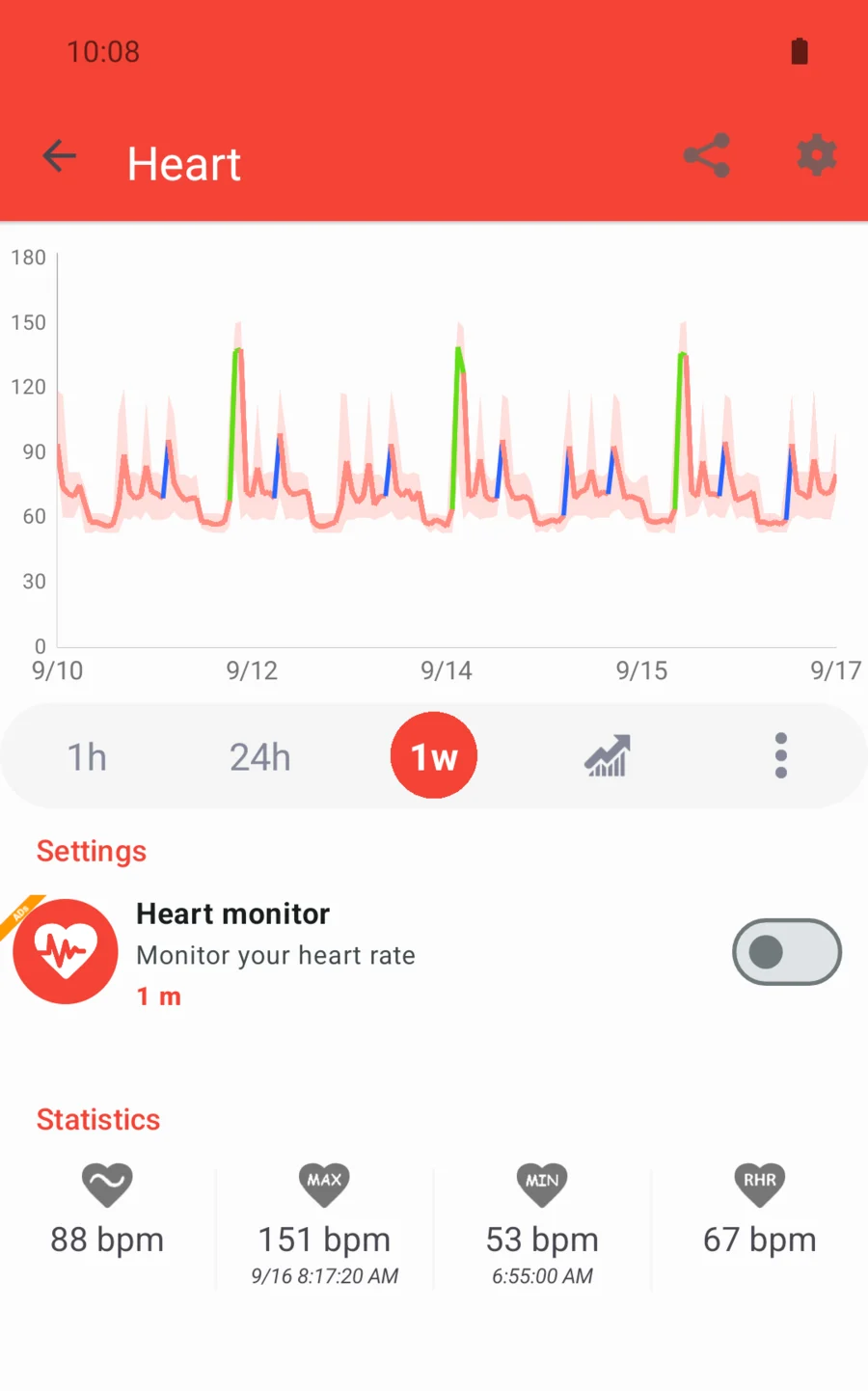
See when your heart-rate readings changed
Explore detailed charts, averages and available resting-heart-rate summaries. Switch between time periods to inspect a session or a longer pattern. During workouts, configured heart-rate zones give you a way to review the intensity distribution of recorded readings.
Balance detail with battery use
Choose a supported measurement interval, with continuous monitoring available only on suitable devices. Set upper or lower threshold alerts where supported. More frequent measurements can increase battery use, so the best setting depends on the records you want to collect.
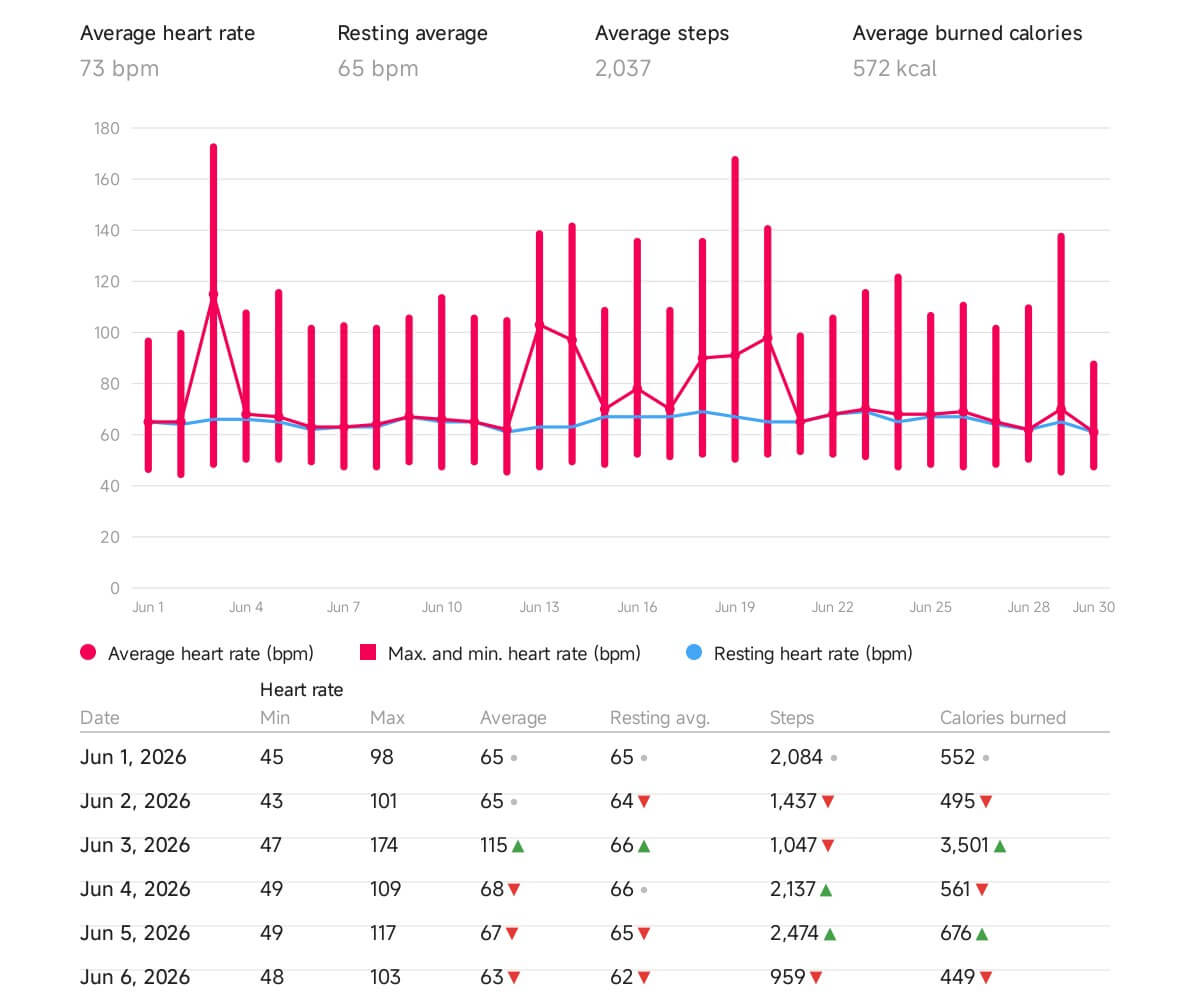
Make noisy charts easier to inspect
Chart filters can hide values outside a selected range or unusually large jumps between nearby readings. This helps you review a graph; it does not repair an inaccurate sensor measurement. A zero value may indicate that a requested measurement failed.
Bring other supported measurements together
Review blood-oxygen and stress history when the wearable records them. Supported devices offer all-day settings and sleep breathing options. Some firmware also requires SpO2 tracking to be enabled on the watch itself.
Keep measurements and context together
When you take a blood-pressure or blood-glucose measurement with your own equipment, you can record the result in Notify. Add a date, time and note, then keep useful context alongside the number: a measurement position, a meal relationship or recent activity, depending on the record type.
- Keep in mind
- For blood pressure, the entry includes systolic and diastolic values and an optional heart-rate reading. For glucose, choose the unit used by your meter and add the context you want to remember. These are records you enter; the feature does not give your watch a blood-pressure or glucose sensor.
Make logging part of your routine
Measurement reminders let you choose a time, repeat days, label and snooze duration for blood-pressure or glucose logging. A preset context can make the next entry easier to fill in. The app can flag unusual or implausible inputs so you can check what you typed; this is not diagnosis or treatment advice.
Keep useful personal details in your profile
The profile includes optional fields for blood type, an emergency contact, allergies, chronic conditions and treatment notes. Enter the details you want to keep together and update them when needed. These are information fields you maintain; they do not establish a diagnosis or guarantee access by emergency services.
Common questions
Can Notify add SpO2 to a watch without an oxygen sensor?
No. Blood-oxygen history requires a compatible device and recorded measurements. Installing an app cannot add missing sensor hardware.
Can I set a high or low heart-rate alert?
Notify exposes configurable threshold alerts on supported setups. Check the options available for your paired device and test their behaviour; they are not medical alarms.
Why are there gaps in my heart-rate chart?
Gaps can reflect measurement intervals, failed readings, missing synced data or enabled filters. Check both the watch's tracking settings and Notify's monitoring and chart options.
Does Notify measure blood pressure or blood glucose with my watch?
This diary records measurements obtained separately. Adding an entry does not make the wearable measure blood pressure or glucose.