Sync Notify with Health Connect, Strava & more
Keep using the tools you like. Notify helps move your wearable records into a wider fitness workflow, whether you want workouts in Strava, health data in Health Connect or a spreadsheet you can analyse yourself.
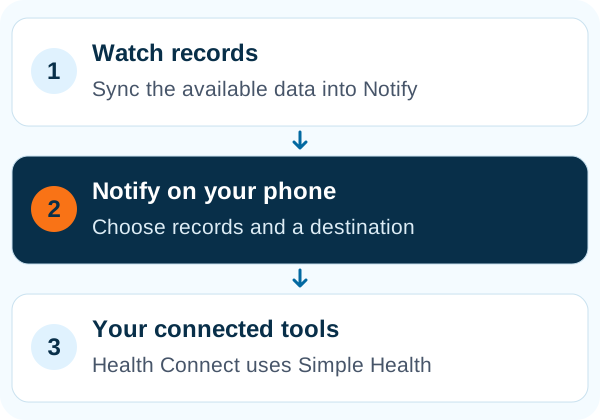
Notify provides external sync options for health records and workouts. Health Connect uses the separate Simple Health companion app. Sync the watch into Notify first, then authorise the destination and select the data you want to send.
Bring supported records into Health Connect
Install Simple Health from Notify's integration screen, complete its Health Connect setup and grant the relevant permissions. Notify exposes sync controls for steps, sleep, heart rate, SpO2, weight and workouts. Which records reach other apps also depends on those apps' Health Connect permissions and supported data types.
Pick the connection that matches your goal
| Your goal | Notify option | What to check |
|---|---|---|
| Share a workout with a fitness service | Strava, Runalyze or Runkeeper | Account connection, external-sync access and available activity data |
| Combine health records on Android | Health Connect through Simple Health | Permissions, data types and a completed watch sync |
| Use another supported health workflow | Google Fit integration through Simple Health | Current companion-app setup and service availability |
| Build your own spreadsheet analysis | Google Sheets integration or spreadsheet export | Destination setup, selected data and date range |
| Take a workout file elsewhere | TCX, GPX or FIT export | The destination's supported format and the workout's recorded fields |
Keep the two sync steps working together
Automatic external sync can send new records only after Notify has received them from the watch. Configure watch-data sync as well as the destination schedule. For older records, use the date-range or manual sync options offered by the integration instead of assuming a new automatic schedule will backfill everything.
Share live heart rate with Pulsoid
Notify also offers a live-heart-rate connection to Pulsoid. Link your account and use the required continuous monitoring mode. On some devices this needs a workout-style tracking session, so review the device notice before using it alongside other tracking.
Common questions
Does Notify connect directly to Health Connect?
In this Notify setup, the integration uses the separate Simple Health app. Follow Notify's Health Connect screen to install it and configure access.
Why has automatic sync not sent today's data?
First check that the watch has synced today's records into Notify. Then check the destination connection, permissions and automatic-sync interval.
Can I send workouts to Strava?
Notify includes a Strava workout-sync option. Connect the account and check external-sync access. The result depends on the recorded activity fields and the service accepting the upload.