 Notify Picture for Xiaomi Watch and Mi Band
Send and display custom images—from your gallery or notifications—on your Xiaomi smartwatch or Mi Band, directly via the Notify app.
What this does
Notify Picture installs a lightweight watch app that displays a single user-selected image on your watch or band. Choose an image manually from storage or automatically from a received notification.
Why it’s useful
- Quickly show a favorite photo, QR code, or memo on your wrist.
- Send images from notifications (messages, app alerts, etc.).
- Instant manual upload through Notify or share intent.
- Designed for privacy: data stays between your phone and watch.
Requirements
- Android phone with Notify for Xiaomi v22.0.0 or newer.
- Compatible watch/band supporting external third-party RPK apps.
Supported models include Mi Band 9/10 and recent Xiaomi Watch models. Notify dynamically detects new compatible devices as they become available.
All processing occurs locally. Images are transferred directly over Bluetooth without external servers.
Install on your watch
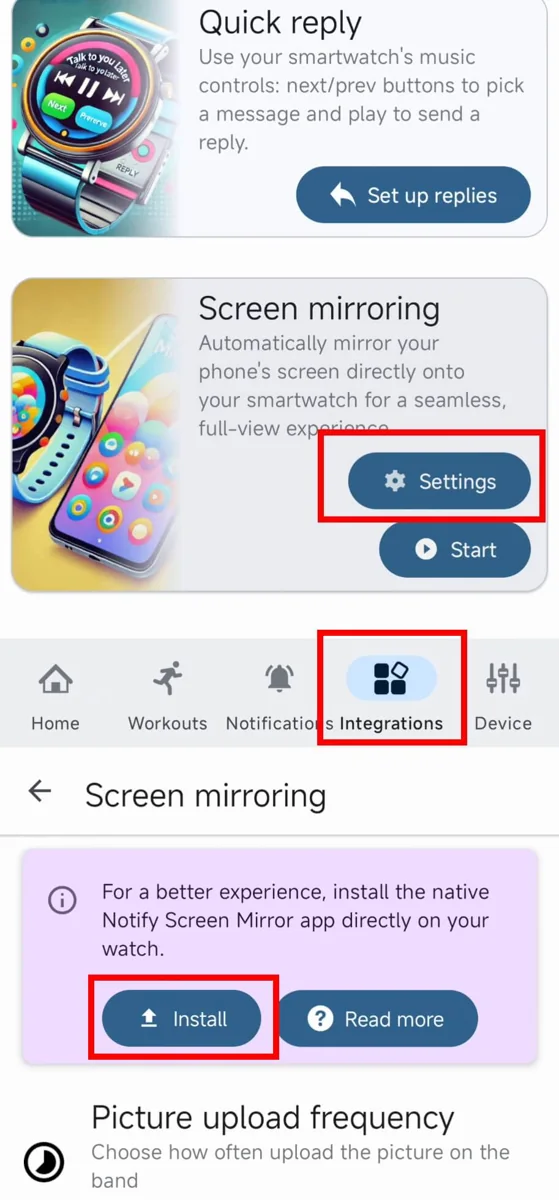
- Open Notify for Xiaomi on your phone.
- Go to Integrations → Picture → Settings.
- If your watch supports it, tap Install to install the Notify Picture watch app.
- Follow the guide until installation finishes.
- The new app “Notify Picture” will appear in your watch apps list.
When you send a picture from Notify, the watch app opens automatically to display it.
How it works
- In Notify, choose Send picture or select Notify Picture from the share menu.
- The image is compressed and sent to the watch.
- The watch app displays the picture until replaced or closed.
High-resolution images are automatically optimized for your watch display size to minimize transfer time.
Key features
- Manual and automatic image sending (via notifications).
- Privacy‑friendly: no cloud or external network use.
- Auto‑launch on watch when image is received.
- Background transfer support for quick updates.
Tips
- Use small to medium images for faster Bluetooth transfer.
- Pin Notify to power-saving exceptions to avoid background limits.
- You can resend an image at any time by tapping Send again in Notify.
Troubleshooting
Picture not showing
- Ensure the Notify Picture app is installed on the watch.
- Check that the watch is connected via Bluetooth.
- Try resending the image or restarting watch and phone.
Transfer too slow
- Use smaller images or reduce resolution to improve speed.
- Keep watch near the phone for better Bluetooth stability.
Notification image not sent
- Enable Notify permissions to read notifications.
- Verify the app sending the notification supports image attachments.
FAQ
Can it show multiple images?
No. The watch displays one picture at a time, which you can replace anytime.
Does it update automatically?
Only when a new picture is sent manually or triggered by an incoming notification with image content.
Does it require internet?
No. The transfer occurs locally between phone and watch.
Can I display animated images?
Animated formats like GIFs are not supported. Use static images such as JPG or PNG.
Get started
Install the Notify Picture app on your watch, then send your first image directly from Notify. Replace or update it anytime.
Ready to Send Your Picture?
Install Notify Picture and display any image you want on Xiaomi Watch or Mi Band.