 Notify Buttons on Xiaomi Watch and Mi Band
Tap buttons on the watch to run phone actions configured in Notify — no custom watchfaces or notification hacks needed.
What this does
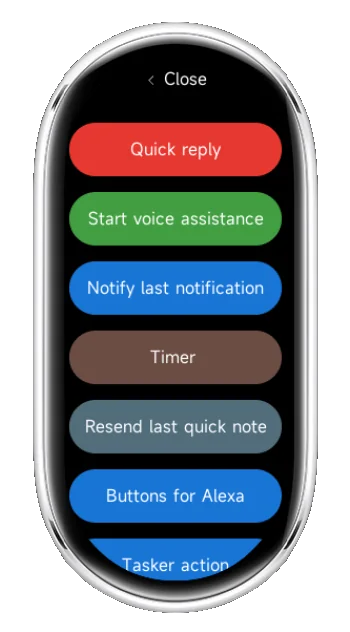
Notify Buttons is a small watch app installed through the Notify guided process that syncs custom actions from the phone and displays them as tappable buttons on the watch for instant execution.
Why you’ll love it
- One‑tap control of favorite phone actions without pulling out the phone.
- Configurable labels, order, and behavior from the Notify app.
- Works reliably over Bluetooth with minimal setup.
- No custom music player workarounds required.
Requirements
- Android phone with the latest Notify app installed and running.
- Compatible watch/band: devices that support installing external third‑party RPK apps.
- Bluetooth enabled and connected between phone and watch/band.
New Xiaomi models are released often. Instead of a static list, Notify detects support dynamically. As a rule of thumb, if the watch/band allows installing third‑party RPK apps, it supports Notify Buttons. Mi Band 9/10 and the latest Xiaomi watches meet this requirement; new compatible models will appear automatically in the Buttons page suggestions.
Privacy friendly: actions are sent locally from the phone to the watch via Bluetooth; nothing is sent to a server.
Install on your watch
- Ensure you have at least the Notify for Xiaomi app v22.0.0 or newer installed on the phone.
- Open the Notify for Xiaomi app on the phone.
- Go to Integrations → Button actions.
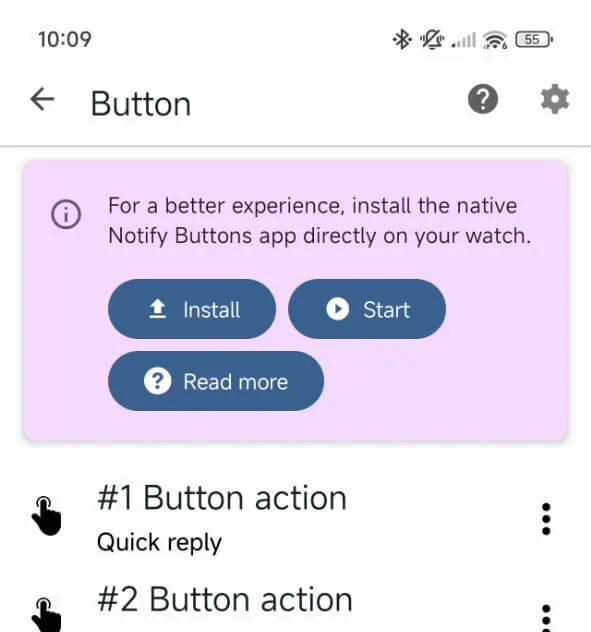
- If your smartwatch is compatible, a popup will appear on top; tap Install to install the Notify Buttons app on your smartwatch.
- Follow the guided steps; keep the watch near the phone until installation completes.
- On the watch, confirm the new app appears in the apps list as “Notify Buttons.”
One‑time setup. After this, just open Notify Buttons on the watch and tap any button to trigger the linked phone action.
Use it in 10 seconds
- On the phone, open Notify and configure actions under Button actions.
- On the watch, open the Notify Buttons app—the configured actions appear immediately.
- Tap a button to execute its action on the phone; close the app to stop.
No other steps are required. Music player workarounds are not needed.
Key features
- Custom actions: toggles, routines, shortcuts, and quick tasks configured in Notify.
- Low‑latency: actions execute quickly over Bluetooth with optional haptic feedback.
- Auto‑sync: changes made in Notify are reflected on the watch without manual pairing steps.
- Battery‑aware: minimal background activity on the watch.
Pro tips
- Add Notify to power‑saving exceptions to ensure prompt execution.
- Place most‑used actions at the top in Notify for faster access on the watch.
- Use concise labels for small screens.
- Each action can be renamed and assigned a custom background color by tapping the settings icon on the item in the Notify app.
Troubleshooting
Buttons not visible
- Confirm your device is supported (latest Xiaomi watches or Mi Band 9/10).
- Verify Bluetooth connection and that Notify is running on the phone.
- Ensure actions are configured in Notify → Integrations → Button actions.
- Restart the watch and toggle Bluetooth if the first sync fails.
Actions not executing
- Open Notify on the phone to refresh permissions/background run state.
- Confirm each action’s target app/permission is still valid.
FAQ
Do I need to use the watch music player?
No. The Notify Buttons app runs independently.
Do I need to install a custom watchface?
No. The Notify Buttons app runs independently, so any watchface can be used.
Can actions be reordered or renamed?
Yes. Manage labels and order in the Notify app; the watch reflects changes automatically.
Does this send my data to a server?
No. Actions are relayed locally from the phone to the watch via Bluetooth.
Get started
Install Notify Buttons on the watch once, then just open it on the wrist to run configured actions in one tap.
Ready to Enhance Your Mi Band?
Download Mi Band Notify today and experience the difference.